Products
ResponseCommandNavigationDeltaTrainingReconDCU
SolutionsTopics
Incident collaborationEmergency navigationCarPlay for emergency vehiclesIntelligent command and controlHazardous materials responseLive vehicle positionsOperational readinessGeoIntegrate your dataPlatform ownershipApple ecosystemCrisis dashboardsCompliance and assurance
SupportTrust & compliance Plan a demo
CarPlay for emergency vehicles

Turn the vehicle display into an operational screen.

LIVENAV brings emergency routes, incident destinations and arrival context to the CarPlay display already in the vehicle. One familiar interface replaces another layer of specialist hardware.

Existing displayUse the screen in the vehicle Native navigationBuilt for the driving context Wired or wirelessConnect the operational iPhone
Less between crew and road

One screen. Less hardware. More focus.

Emergency vehicles accumulate displays, controls and single-purpose devices. A native CarPlay experience lets navigation use the vehicle interface crews already understand.

01Reduce visual clutter

Bring guidance onto one central display instead of adding another navigation screen.

02Lower complexity

Use standard vehicle and Apple hardware as the basis for specialist operational software.

03Keep it familiar

Give crews a consistent interaction model across vehicles, screen sizes and controls.

Separate systemsMore to manage
Integrated displayReady to drive

Operational navigation

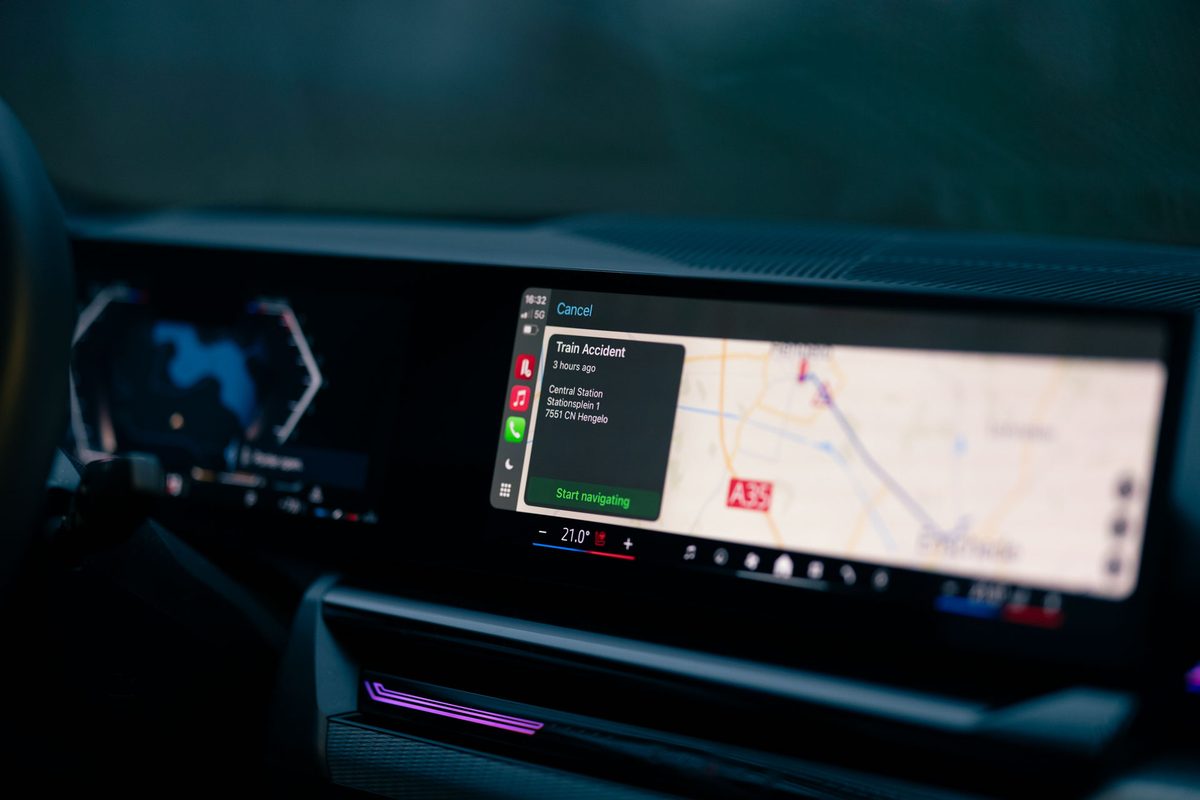
LIVENAV incident navigation displayed through CarPlay in a vehicle
A connected vehicle experience

The vehicle becomes part of the operational platform.

LIVENAV turns compatible production vehicle displays into an emergency navigation interface, without adding a second navigation computer.

Native CarPlayRunning from the operational iPhone
From alarm to arrival

The route is only one part of the journey.

CarPlay can carry the essential thread of the response from the moment a crew is assigned until they reach the exact operational destination.

P1
NEW INCIDENTIndustrial fireHavenstraat 12, Enschede
Accept
01Receive the incident

The assignment arrives with identity, priority and destination already connected.

AI ROUTE SUMMARY8 min1 road work · 1 bridge opening
Start
02View instant route insights

An instant AI-generated summary of the route before guidance starts: road works, bridge openings and other conditions that affect the drive.

400 m↱N733
08:14arrival
03Navigate with focus

Large guidance, a clear route and an interface shaped for short interactions while moving.

USE EAST GATEStaging 120 m
04Arrive at the right place

Navigate to the entrance, gate, staging area or task location that matters operationally.

The incident rides along

Context stays available without recreating the control room.

The driver needs guidance. The crew still needs to know what they are driving toward. LIVENAV keeps the essential incident layer accessible through native CarPlay patterns.

Incident identity, classification and priorityAssigned disciplines and responding unitsLive incident messages, optionally read aloudOperational destinations such as incidents, assignments and reconnaissance tasks
The address is not the destination

Guide crews to the operational point of arrival.

A street address can leave a vehicle on the wrong side of a large site. LIVEOP can provide the entrance, access gate, staging area or task location as the actual destination.

Fewer final-minute correctionsThe route reflects how the incident site should be approached.A prepared handoverCrews arrive with the latest message and the next operational action already clear.
A better vehicle architecture

Less custom hardware creates value beyond the screen.

Using a broadly supported vehicle interface can simplify the build, operation and renewal of an emergency fleet.

Simpler installation

Reduce the number of dedicated computers, displays, brackets, cables and vehicle modifications.

Easier maintenance

Keep operational capability in managed software that can be updated without rebuilding the dashboard.

Lower energy demand

Fewer redundant devices can reduce power use and the load placed on the vehicle installation.

More adaptable vehicles

Less permanent specialist hardware can make fleet changes and later vehicle reuse less complex.

From one vehicle to a fleet

A standard interface, operationally configured.

CarPlay gives the fleet a familiar display layer. LIVEOP adds the emergency navigation, deployment model and incident integration your operation needs.

FAQ

CarPlay in the emergency vehicle.

Does LIVENAV need a separate navigation computer?
No. LIVENAV runs natively on the iPhone and can present its driving experience on a compatible CarPlay display. This can reduce the need for another dedicated navigation unit.
Does it work with wired and wireless CarPlay?
Yes. The connection method depends on what the vehicle supports. LIVENAV can work through either a wired or wireless CarPlay connection.
Can the route come directly from an incident?
Yes. LIVEOP can pass an incident, assignment, task or other operational destination into the navigation flow, including relevant route context and incident information.
What happens when connectivity is limited?
LIVENAV supports offline maps and offline route calculation. Available live updates naturally depend on a data connection, while the core route remains usable in weak-coverage areas.
Will it fit every emergency vehicle?
The vehicle needs a compatible CarPlay system. CarPlay handles many differences in screen size and supported input methods, while rollout validation confirms the exact vehicle and device configuration.

Put operational navigation on the screen crews already know.

Explore how LIVENAV and CarPlay can simplify your next vehicle configuration.