
Recon
From field reading to checkable assessment.
Set out the measurement task, receive the reading, recalculate it against the intervention value for the exposure duration assumed, and plot the effect area on the wind. One orderly process gives the measurement-plan leader more time and a result they can explain.
Reconnaissance becomes an organizational capability.
LIVERECON gives the field and command the same orderly chain from assignment to assessment. The method remains visible during pressure, survives handover, and leaves a record the organization can review and improve.
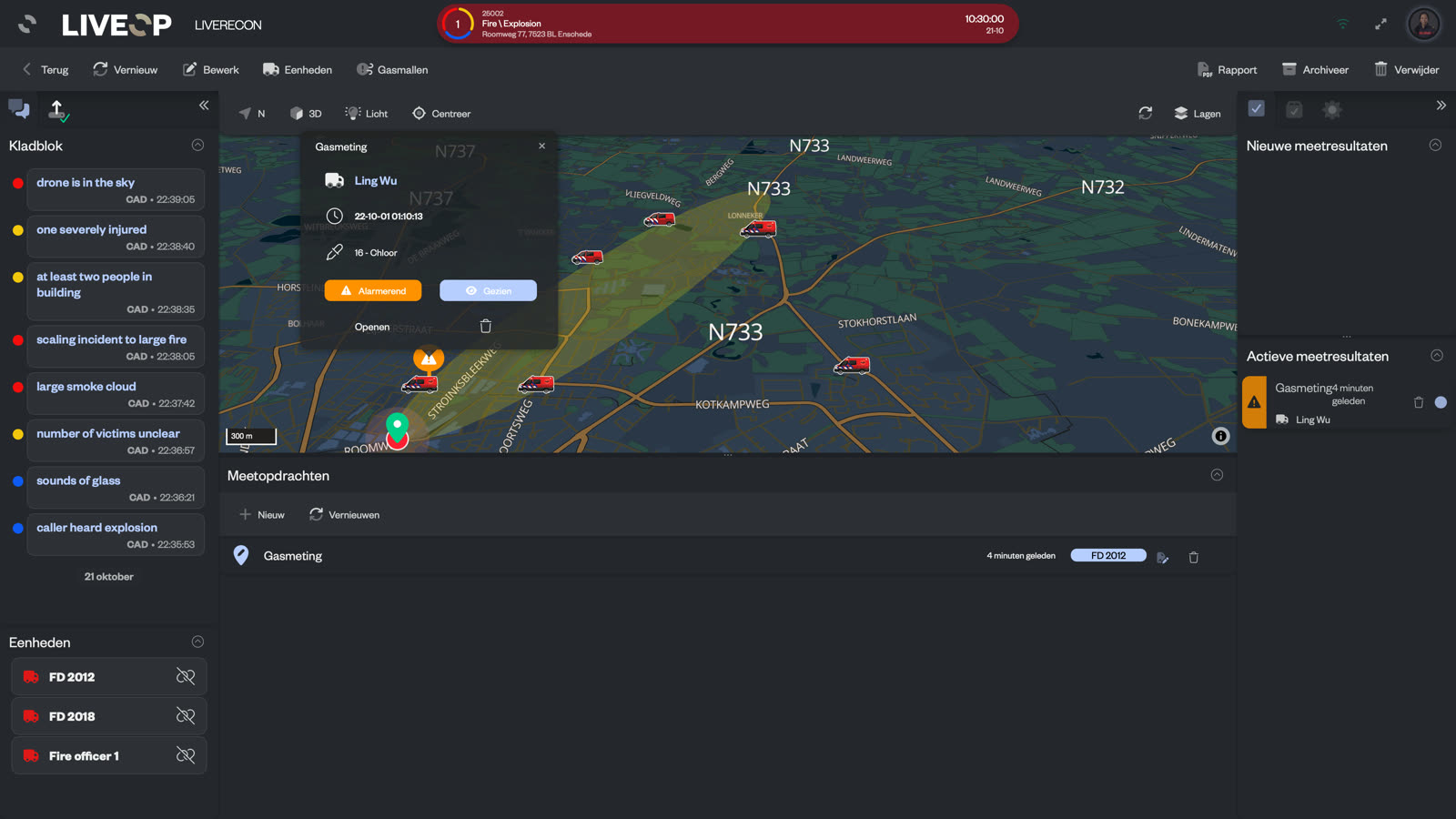
Four steps, one continuous process.
Every handover between a map, a radio message, a calculation and a separate drawing costs attention. LIVERECON keeps those steps together, so the officer running the plan can see what is happening and move the round forward without rebuilding its context.
Place a measurement task on the map, add the right form and instructions, and send it to one or more units. Copy an existing task to a new point to build a measurement line or ring without retyping it.
Bring the field reading back into the incident with its location, task and crew context intact.
Show every correction and compare the corrected reading with the applicable intervention value.
Scale and orient the selected operational effect-area template on the wind.
The arithmetic is visible. The decision remains with the officer.
A raw reading is not an assessment. LIVERECON applies the substance correction factor and pump-stroke correction, converts the corrected reading where required, and tests it against the intervention value for the exposure duration selected by the user.
Start with what the crew entered
Raw values remain visible beside the substance factor, pump strokes, pump correction and combined correction factor.
Make the time assumption explicit
The officer selects the assumed exposure duration. The active limit and calculated outcome change with that assumption.
Keep professional judgement in command
The software calculates and shows the outcome. The measurement-plan leader assigns the final assessment, which may differ.
The corrected reading, conversion, exposure duration, intervention value, active limit and calculated alarm level stay together. The officer can check the derivation while the incident is active and against the organization's own authoritative source afterwards. The arithmetic is no longer held in their head while they work in the dark with a radio in the other hand.

Place the operational template where the incident needs it.
Choose a predefined effect-area template, give it the required dimensions, and orient it by compass point or degrees. LIVERECON projects, scales and rotates the ellipse as a map polygon, including the latitude correction needed for accurate geometry. Because the effect area and returned measurements sit in the same incident view, the leader can revisit whether the selected operational template still fits the evidence.
Every open assignment stays visible.
LIVERECON separates assignment progress from result review. That gives the measurement-plan leader a practical overview of work in the field and work waiting at the desk.
See what is still out in the field
See whether an assignment has been accepted, is in progress, was declined, was reassigned or has been completed.
See the real review queue
Distinguish a new result from one seen, approved, returned, declined or fully recalculated and completed.
Send an uncertain reading back
Return a result with a comment when it does not fit. The assignment goes back to the field and remains tracked.
A declined assignment that was never reissued can otherwise disappear into the map as if no work belonged there. LIVERECON keeps the assignment state visible, so the measurement-plan leader can reassign it and restore the intended coverage.
Configure the way your service measures. Train the same chain.
Choose the assignment forms your service uses, connect measurement types to devices, control which units can receive tasks, and keep instruction cards with the assignment. Available templates cover instrument measurements, sampling, deposition, odour and visual observations, and other reconnaissance work. Exercise incidents use the same forms and validation process without being confused with live work.
Attach a station name and suffix to a unit, so the incident page shows a name the crews recognise.
The reasoning stays with the incident.
Assignments, results, correction steps and effect areas remain connected in the incident record. The incident report brings the round together for handover, debrief and the file, while closed incidents open read-only.
The incident view keeps the map beside the working panels for tasks, new and active results, units, notes, messages, weather and effect areas. The next officer can understand not only what was concluded, but which work was still open and which assumptions supported the assessment.
Questions measurement teams ask.
Does LIVERECON make the final assessment?
Does LIVERECON calculate atmospheric dispersion?
Can we verify the values behind a calculation?
What happens when a reading does not fit the pattern?
Can we adapt the assignments to our service?
Can teams train with the same process?
Run a whole round before you run a real one.
Exercise incidents run the identical chain: the same forms, the same corrections, the same intervention values, the same effect-area templates. Put your own release scenario through it with your own crews and your own devices, and read the file it produces afterwards. If the derivation does not convince the officer who would have to sign it, nothing has been risked finding that out.
The version to forward
LIVERECON does the recalculation the measurement-plan leader is currently doing by hand under pressure, and prints every step of it, so an assessment can be checked against our own source afterwards. The officer still assigns the final assessment. It plots operational effect-area templates and does not claim to model dispersion. The whole round can be exercised end to end before it is used on a live incident.
See the reconnaissance round in action.
Plan a demo and we will show you how LIVERECON keeps measurement tasks, readings, correction steps, the officer's assessment and the effect area together in one calm, checkable process.